 Porch Light Desk
Getting found · Service areas
Service-area pages that win local jobs (and the kind Google ignores)
Quick answer: A service-area page is worth building when it has something true and local to say about that town: the jobs you actually do there, how you get there, what homeowners there run into, and a number they can tap. A page that just swaps the city name into the same paragraph is a doorway page. Google treats those as spam, and homeowners can smell them. Build fewer, better town pages, and only for places you really serve.
Most contractors work more than one town, and homeowners in the next town over search "roofer in Franklin" or "AC repair near me." A good service-area page answers that search honestly. A bad one is how a site ends up with fifty copies of the same page and none of them ranking.
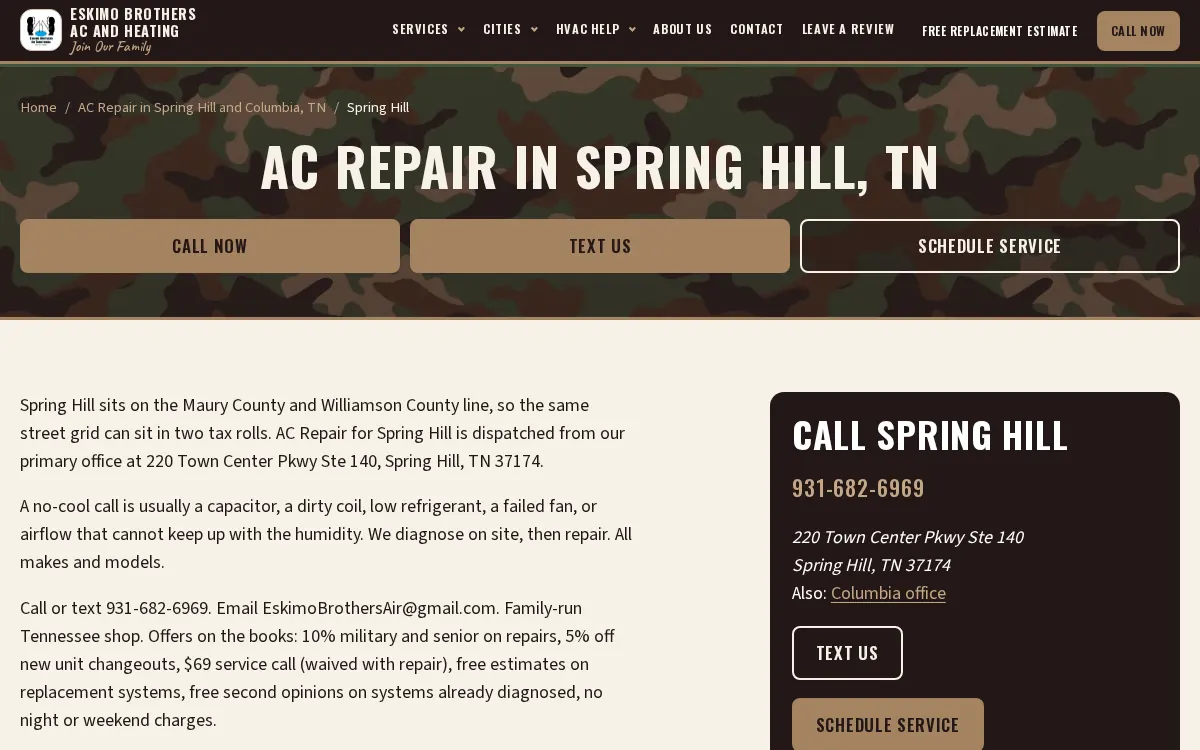
What is a service-area page, and do I need one?
A service-area page is a page on your site about one service in one place, like "AC repair in Spring Hill" or "termite control in Columbia." It exists so that someone searching for that job in that town lands on a page that is clearly about them, instead of a homepage that lists twelve towns in tiny print at the bottom.
You need one when a town matters to your business: you get real calls from there, you want more, and you can actually show up fast. You don't need one for every place your truck has ever driven through. If you would turn the job down, don't build the page.
What makes Google treat a town page as spam?
Google's spam policies call these doorway pages: lots of near-identical pages made to rank for slightly different searches, each one funneling people to the same place. The classic version is one paragraph about "the best plumber in [City]" copied fifty times with the city name changed. Pages that break Google's spam policies can rank lower or not show up at all.
Homeowners spot it even faster. If nothing on a page about their town is actually about their town, it reads like a form letter, and they tap the next shop.
What should a good service-area page actually say?
The test is simple: could this page only have been written about this town? Things that pass that test:
- The real service and the real town in the headline. "AC repair in Spring Hill, TN" is plain and clear. Skip "best" and "#1."
- How you get there. Which office or yard the truck comes from, whether that town is part of your regular route, and any honest note about timing.
- Local details you actually know. Older neighborhoods with original ductwork, slab homes that get a certain kind of leak, a county line that changes the permit office, hard water that eats water heaters. Only write what you've seen on jobs.
- Jobs you've done there. Photos from real work in that town, with the customer's permission, beat any stock photo.
- A way to reach you on the first screen. A tappable call or text button and the same main number you use everywhere else. The first-screen post covers that part in detail.
- Answers to the questions people in that town ask. Short question-and-answer sections help homeowners, and they give Google and AI tools clean answers to quote.
How many town pages should I build?
Fewer than you think. Start with the towns where you already get the most work and the ones you most want to grow into. For a lot of small shops that is three to six towns, not thirty. Three strong pages that each say something real will usually do more for you than thirty thin ones that say nothing.
If you offer several services, you don't need every service in every town on day one. Pair your main money-maker with your main towns first. The HVAC site above starts with Spring Hill and Columbia, where the shop has its two offices.
Should I list towns I don't really serve?
No. Listing every town in a 60-mile circle to look bigger backfires. You get calls you have to turn down, and your site ends up saying something different from your Google Business Profile. Keep the towns on your site, your Google listing and your truck the same. We wrote about why that matters in why your website and Google Business Profile have to match.
If you stop serving a town, take the page down or point it to your main service page, and remove the town from your profile at the same time.
Do town pages help with ChatGPT and Google AI Overviews?
They can. AI answers tend to pull from pages that state plain facts clearly: who does the work, what the job is, where they work and how to reach them. A town page that answers "Do you serve Columbia?" in one honest sentence is much easier to quote than a homepage with a long list of towns in the footer. The same rules apply as for regular search: the page has to be crawlable, readable on a phone and actually useful. More on that in how contractors get found in ChatGPT, Gemini and Google AI Overviews.
How do I link town pages so people and Google find them?
- Link each town page from its main service page ("We also serve Spring Hill, Columbia and Franklin").
- Link back from the town page to the main service page, the contact page and a page of your real work.
- Keep the address in the web bar short and plain, like
/ac-repair/spring-hill-tn/. - Put every real town page in your sitemap, and leave out test pages and copies.
Where should I start this week?
Pick the one town where you most want more work. Write down three things that are true about jobs there that aren't true everywhere else, and grab two or three real job photos from that town. That is the start of a real service-area page.
If you'd rather have it built for you, town pages like these are part of how we build contractor websites and HVAC websites. You can see them on live shops in our portfolio, and the packages are on the services page.
If you want a second set of eyes on the town pages you already have, text me the link and I'll tell you honestly which ones are pulling their weight.
The porch light is on.
Ready for a uniquely built site?
Nashville studio. Nationwide remote. 50% up front, 50% on completion. Text Erik or email, whichever is easier.